What is Bleed in Printing?
Printing with Bleed? Or Full Bleed Or No Bleed, Sound Familiar?
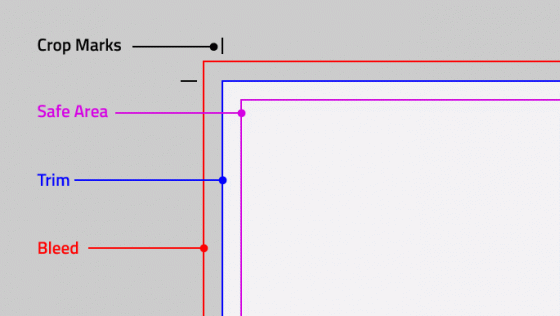
Where you ask to design a file that contains bleed in printing? In the printing industry, there is a term called “Bleeding” to refer to a specific tactic. Bleeding mostly means “no borders”. For bleeding the design wich is going to be printed, the designer needs to extend the canvas an additional 0.25″ (1/4 of an inch) vertically and horizontally. This extra space is not used for text or important data as it’s going to be Trimmed off (cut) just to create the effect as if the product was printed all the way to the edge with no borders.
Bleed is mostly used to extend the background of the image further away just about a quarter-inch further than where the cutting line goes. For images with no backgrounds, we also see stripes, lines fade or even segments of the designs like “line deviders” that cross all over the printed product.
Full Bleed is the actual term used most of the time to indicate that the printing will go all the way to the border. People already simplified the “Full Bleed” words to just use the word “Bleed” to replace it.
Each country has its own natural bleeding techquines:
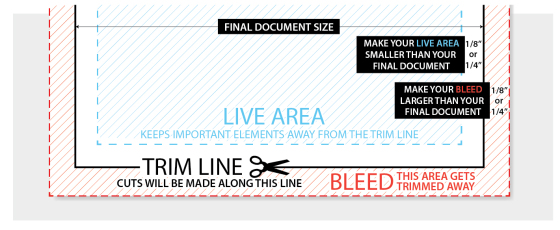
For each country and printer company, the different bleed requirement may be required. This information may be found at the printer’s website or by downloading pre-set-up templates.
Online USA: For the online market we tend to see 0.25″ bleed mark as the standard to allow broader range and compatibility with almost any printing press and design team.
Local USA: For old times designers and old-school print stores, requirements are for 1/8 of an inch (0.125″) as the preferred bleed minimum requirement. All printers are capable of managing this amount of bleed, but still, online printers rather bigger bleed areas.
Europe: Within Eastern printing market we see a wider range of acceptance for bleed as they require all the way from 2mm up to 5mm on the design file. This varies a lot from one printer to another with no exact reason.
Bleeding Technique
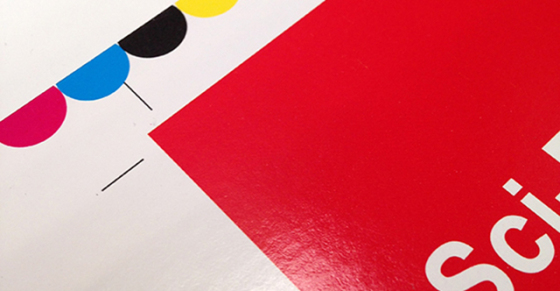
Bleeding is mostly based on the visual illusion that your printed product was printed all the way to the edge of the paper. There are printers with this sort of capabilities, no doubt about it. But the technique of bleeding won’t stop there, people will ask for this service on every level of the print chain. From color copies to business cards, people love to have them bled all the way to the corner. Sometimes bleeding comes with an extra cost, it might be losing the space which is being trimmed of; another way to lose. Your printer will charge you some extra bucks to have your print out trimmed off to the edge. Last but not least, your print order could de delayed for some extra hours or days if you request them to bleed it for you.
Most products in the market are already quoted to contain the bleeding. So the price already contemplate the possibility of full bleeding in your art with no additional charges and no additional turnaround to your print order. If you look to any of the prime online printers in the market like VistaPrint or 55printing, you will notice that there is no mention on extra cost or extra cutting time for bleeding designs except for the cheap color copies by 55printing.com that requires extra steps to bleed out.
Printers With Bleeding Capabilities (borderless)
During these few past years, the need for full-bleed printing has been increasing dramatically. Consumers don’t like the white border in their print outs anymore. Looks unfinished and out of touch for most of the applications, consumers needed a way to replicate full bleeding in some way.
- Trimmer: First choice was to buy a home trimmer to cut off the white edge out of the printed paper. Sounds good but, will you trim each page, each photo off? It could take you hours to do so manually. Also, cutting might not be just perfect and you will end up re-printing it for a second try.
- Ordering Trimming at a Print Shop: Print shops are no cheap, extra services like trimming might cost an extra couple of bucks as well. So this is not the most practical way to go about trimming your print outs.
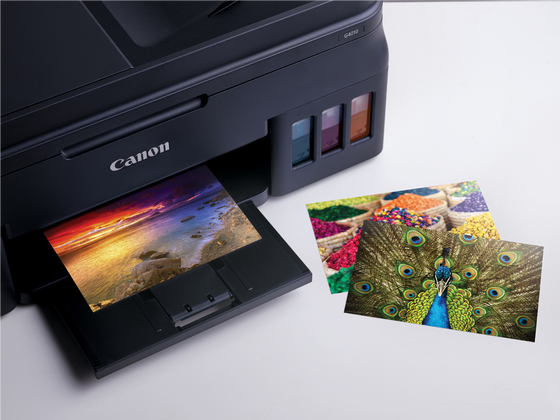
- Buy a Home Printer: We saw it first in 2006 with an Epson printer that was offering borderless (full bleed) printing right off the bat. The technology was still very new back then and many errors and flaws would come in consequence to this. Now, about 15 years later, this technology has grown and perfected to a way you won’t have to worry about it. Home printers like the Canon PIXMA G1010 will do the job for you just right, every time!
A Little More About The Inkjet Canon PIXMA G1010
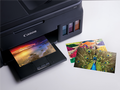

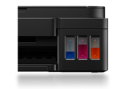
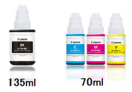
This Canon printer is among the most popular home-based, high volume printers that support many capabilities to make your life easier as we are about to enumerate here:
- Refillable Cartridges: The design allows easy to watch ink levels, you notice as soon as the levels are going down just from in front of the printer. Then you may proceed to re-fill it as you wish. No need to go buy additional ink cartridges for this.
- Non-Spillable Refills: You can buy ink by bulk, these little refillable bottles come with a technology that you will not create any mess around the printer or your table.
- Borderless Printing (Full Bleed): This printer allows borderless printing on images and paper smaller than the bay size. For example, you can feed the printer with picture or postcard size glossy paper (4″ x 6″) and it will print it all the to the border with no issues.
- High Volume Prints: This printer comes for higher volume capabilities, recommended to use for printing jobs between 150 and 1,500 sheets at a time. No overheating, no paper jamming, no issues for this sort of volume. If you increase the paperweight, allow extra rest time between print-outs.
- Ink Will Not Smudge on Glossy Paper: Often seen when you use not a compatible glossy paper on home-based inkjet printers. The ink will just drip off and smudge out of the glossy paper causing a real chaos. This printer is compatible with a wider range of glossy paper to avoid ink smudge for the most part.
Bleeding a Cheap Color Copy
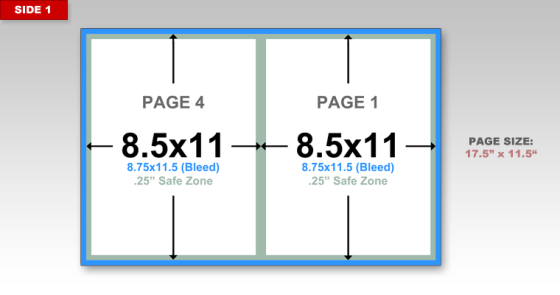
Unfortunately, there is still no reliable or clean color copy machine available to the public with borderless capabilities. The reason is very clear, toner burning consumes a lot of space, if you decide to print all the way to the border, there are going to be a lot of toner waste and not enough space to store it while printing higher volume projects.
For home consumers, we would just recommend buying the trimmer and cutting off the paper after it has been printed out. The sad part is that the paper will look a bit smaller than a regular standard letter-sized paper and this will subtract personality out of the paper. Another choice would be to use a 12×18 color copier machine. A bigger sheet of paper will allow to use it as two standard size sheets even after being trimmed. To convert a 12″x18″ into 2 full bleeded sheets 8.5″x11″, additional design setup is required.
Resources:
- Canon.com
- Chimi-printing
- Wikipedia
- 55printing.com
Appeared first on https://cheap55printing.com/
What is Bleed in Printing? syndicated from https://cheap55printing.com/
Here article What is Bleed in Printing? was originally published on Sophie Johnston
