Best Car Dash Cams
- Super slim design
- GPS video tracking
- Voice control
- Wireless video sharing
- Intuitive mobile app
- Price under $50

Last Updated: A day ago
We reviewed all the information and product recommendations in our best car dash cams roundup. The KDLINKS X1 remains our best car dash cam, with YI holding on as our top budget pick. We updated prices and features, added dash camera specs, and noted a new version of the Rexing V1 that comes with built-in GPS.
When you start shopping for a dash cam, don’t be afraid to take it slow. Dash cams have so many features in common that it can be hard to parse out what makes each one unique.
To give you a head start, we’ve researched a number of cameras and chosen six to recommend.
KDLINKS X1 tops our list thanks to features like automatic video recording, a wide field of view, and high-definition video that lets you read a license plate up to 50 feet away.
Here's a Rundown of the 6 Best Car Dash Cams
Compare the Best Dash Cams
| Price* |
| Dash Cam |
| Field of View |
| HD Video |
| Lane Departure Warning |
| Built-In GPS |
| Micro SD Card Included |
| Check Price |
|
Best Overall
|
Best Features
|
Budget Pick
|
Best Sound
|
Best Night Vision
|
Best Voice Control
|
 |
 |
 |
 |
 |
 |
| $299.00 | $199.99 | $49.99 | $99.99 | $124.99 | $133.79 |
| KDLINKS X1 | Garmin 55 | YI Smart | Rexing V1 | Z-Edge Z3 | Garmin Speak Plus |
| 165° | 122° | 165° | 170° | 155° | 82° |
| 1080p | 1440p | 1080p | 1080p | 2.5K | 1080p |
| X No |
✓ Yes |
✓ Yes |
X No |
X No |
✓ Yes |
| ✓ Yes |
✓ Yes |
X No |
X No |
X No |
✓ Yes |
| ✓ Yes |
✓ Yes |
X No |
X No |
✓ Yes |
✓ Yes |
| View on Amazon | View on Amazon | View on Amazon | View on Amazon | View on Amazon | View on Amazon |
*Amazon.com List Price as of 11/1/19 2:30 p.m. MST. (Full disclaimer)
The Best Dash Cam Reviews
KDLINKS X1 Dash Cam: Best Overall
Standard Features
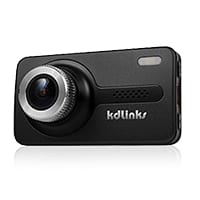
The KDLINKS X1 has all the standard features of a dash cam, with HD video, 1080p resolution, and a 2.7-inch screen. It starts recording when you turn on your car, and the footage loops, erasing older footage. It has a wide angle lens that delivers a 165-degree field of view.
Bonus Features
- At only a half-inch thick, this camera has a super slim design.
- The camera can rotate a full 360 degrees, so you can turn the camera to record in any direction, which is great if you want to record an interaction with someone outside your vehicle.
- The video playback software includes a map and route information for each video, so the viewer can see exactly where an incident occurred.
- The X1 comes with a high-quality lithium-ion battery designed to withstand extreme temperatures.
- The memory card is included with your purchase.
Drawbacks
The X1’s built-in accelerometer will lock down your video recording if it detects a crash, but its sensitivity means that hitting a pothole may also trigger the lockdown response.
We also wish you didn’t have to manually set the time, because an automatic time stamp seems like a feature that should come standard with a GPS-enabled device.
Pros
- High video quality
- Slim design
- GPS video tracking
Cons
- Sensitive crash sensor
- Manual time setting
Summary
The KDLINKS X1 checks a lot of boxes for a great dash camera: it has high-quality video recording that can let you read license plates 50 feet away, superior night vision, comprehensive computer software, and a small, discreet design. There are a few features that you might need to tweak to get it working to your satisfaction, but overall it’s a good buy.
Garmin Dash Cam 55: Best Features
Standard Features
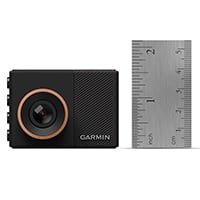
The Garmin Dash Cam 55 comes with all the standard features of a GPS-enabled dash cam, but it’s smaller than most at only 1.5 x 2.2 inches. It has 1440p video capture with a 122-degree field of view, with looped recording and collision detection for automatic recording.
Bonus Features
- Traffic safety warnings will alert you when you get too close to the person in front of you or if you start to drift out of your lane.
- The Travelapse feature lets you condense a long trip into a brief, sped-up video clip that you can share with friends and family.
- Sharing video is easy with this HD dash camera’s built-in Wi-Fi and VIRB app, which lets you stitch together video.
- You can control your Garmin 55 using only your voice: just say “Okay, Garmin,” and then give a command like “Start recording” or “Take a photo.”
Drawbacks
The Garmin 55’s field of vision is narrower than other dash cams, so you might not get a good view of what’s happening on either side of your car. The traffic safety warnings can get annoying, especially in stop-and-go traffic, but you can turn them off if they bother you.
This model has had some issues with overheating, and it doesn’t do well in extreme temperatures.
Pros
- Voice control
- Travelapse photo feature
- Wireless video sharing
Cons
- Narrow viewing angle
- Overheating issues
Summary
When it comes to dash cams, you want something that’s simple to use while you’re driving and makes it easy to share video when you need to, and the Garmin Dash Cam 55 does both very well. It’s pricier than other models, but its built-in Wi-Fi, hands-free controls, and fun Travelapse feature justify the higher price tag.
YI Smart Dash Cam: Budget Pick
Standard Features
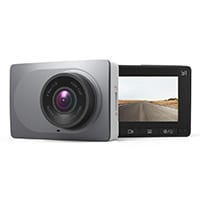
The YI Smart Dash Camera records at 1080p and has a nice, wide 165-degree-angle lens. It’s a little bigger than other dash cams at 3 x 2 inches, but it has all the standard features of a good dash cam, minus a built-in GPS.
Bonus Features
- The built-in Wi-Fi and intuitive app let you download video wirelessly from the YI dash cam.
- The camera has excellent night vision and an infrared filter to reduce glare.
- You can set the sensitivity of the collision sensor if you’re getting a lot of false impact detections.
- The YI has lane departure warnings to help you stay safer on the road.
Drawbacks
Despite the 1080p resolution, the YI image quality isn’t always great, but you can improve it by rotating the lens and manually refocusing it.
The driver lane assistance is often unreliable and will alert you even if you’re driving straight between the lines, so you may want to turn it off.
Pros
- Clear sound recording
- Intuitive app
- Straightforward camera buttons
Cons
- Unreliable driver assist
- No GPS
Summary
The YI Smart dash cam gives you everything you need in a good dash cam, but you won’t get a GPS at this price point. It’s good for getting a basic record of collision events, and we like the wireless video download feature, which is something usually seen only in higher-end dash cam models. If you’d like to have a basic, inexpensive device just in case you’re in a wreck, the YI is a solid choice.
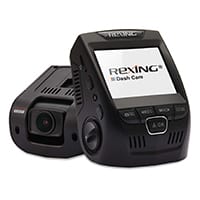
Rexing V1: Best Sound Recording
Standard Features
The Rexing V1 has all the standard features you expect from a dash cam, with a 2.4-inch screen and a nice, wide 170-degree field of view. It delivers respectable video quality, recording at 1080p, and 30 FPS. It loops the recording, and it has a G-sensor that will lock the video if it detects a crash—but it doesn’t have GPS.
Bonus Features
- The V1 lets you add a watermark stamp to your videos with your license plate number, which is helpful if you ever need to turn the video over to law enforcement or your insurance carrier.
- The camera has a full 30-second delayed shutoff, so it will continue recording for thirty seconds after you turn off your car.
- Rexing offers top-notch customer support and a two-year warranty, and some customers even report being able to return their camera for a replacement after the two years were up.
- The V1 has great sound recording quality, but you can mute it with the touch of a button.
Rexing Dash Cam Update
A newer version of this camera was released that includes built-in GPS. The Rexing V3 Dual Camera starts around $200, and is available on Amazon now.
Drawbacks
This model doesn’t come with GPS, but it does have a GPS hookup if you want to add one. Because of the design, you have to carefully mount the camera so your horizon line is correct.
It comes with adhesive tape instead of a suction mount, which doesn’t hold up well over time or with extreme temperatures. Plus, the night vision isn’t as clear as we’d like.
Pros
- Quality sound recording
- Good customer service
- Low profile design
Cons
- No GPS
- Weak night vision
Summary
At just under $100, the Rexing V1 is a solid choice if you’re on a budget, but we recommend investing the extra money to get it hooked up to a GPS. It doesn’t have a lot of fancy features, but its drawbacks are minimal, and its strong customer service should take care of any issues that come up.
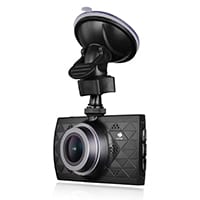
Z-EDGE Z3: Best Night Vision
Standard Features
The Z-EDGE Z3 has all the standard dash cam features but no GPS. It records in Ultra HD 2.5K video, with a 3-inch screen and 155-degree viewing angle. It has HDR night vision, crash detection, and motion detection for when the vehicle is parked.
Bonus Features
- The Z3 delivers a sharp picture from day to night due to its high-definition image quality.
- Parking Mode and motion sensors will make the camera start recording if motion is detected or if someone bumps your car, even if your car is off.
- The Z3 comes with a 30-day money-back guarantee, an 18-month warranty, and lifetime customer support.
- The included USB adapter has an extra port, so you can still use your car’s cigarette lighter to charge your phone while your dash cam is plugged in.
Drawbacks
At this price point ($125), we expect to see an integrated GPS in this dash cam, but the Z3 doesn’t include one. The camera also doesn’t have a touch screen, so you’ll have to spend some time fiddling with the buttons and the onscreen menu.
And the included USB cord is only for power—you’ll have to purchase a different cord to download videos from the camera to your computer.
Pros
- Super HDR night vision
- Parking mode
- Extra USB port
- Minimal picture distortion
Cons
- No GPS
- No touch screen
Summary
The Z-EDGE Z3 gets high marks for picture quality, and we really like the motion- and vibration-sensing feature in Parking Mode. These qualities justify its spot in this price range for dash cams, but we recommend getting an add-on GPS unit to give you total coverage in case of an accident.
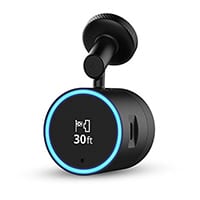
Garmin Speak Plus: Best Voice Control
Standard Features
The Garmin Speak Plus is like a tiny Amazon Alexa for your car with all the standard features of an included dash cam. It has an 82-degree field of view, records at 1080p resolution, and has GPS technology.
Bonus Features
- The Garmin Speak Plus mobile app lets you use voice commands to operate the navigational system, camera, and Alexa features.
- With the Garmin VIRB app, you can wirelessly download photos and video from your dash cam and edit them.
- You can route your Garmin Speak Plus through your car’s speakers, so you can use Alexa to stream music, play interactive games, and more.
- The dash cam includes forward collision and lane departure warnings to keep you safer on the road.
Drawbacks
The Garmin Speak Plus has just an 82-degree field of view, which is half the coverage of less expensive dash cams.
You have to use your own phone’s data plan if you want to enjoy the Alexa features in the car, and you have to keep the Speak Plus app running in the background on your phone as you drive.
Pros
- Amazon Alexa integration
- Voice control
- Voice assist
Cons
- Limited field of view
- Data plan required for Alexa features
Summary
If you’re already an avid Alexa user and you want to enjoy the convenience of a digital assistant in the car, the Garmin Speak Plus is a good dash cam for you. The camera itself isn’t the best quality, but its useful Alexa features and the integrated navigational system earned it a spot on our list.
Best Dash Cams: Benefits
A dash cam can protect your finances, your time, and your personal property in a number of ways.
- Scare off dishonest people who try to take advantage of you.
- Provide evidence that’s far more reliable than eyewitness testimony.
- Accelerate the reporting and processing of an accident.
- Prevent the need to submit an appeal.
- Save you money in damages.
- Help mitigate potential spikes in your insurance rate.
A dash cam can even help you save good memories or increase your YouTube hits. But whatever side benefits you get from a dash cam, the core benefit is that it provides a rock‐solid, nearly indisputable alibi.
You have to buy one first, of course. But if it saves you from even one wrongful citation, a dash cam could essentially pay for itself.
How a Dash Cam Works
These days it may feel odd, outdated, or even extravagant to buy a camera with a single function. Next to a smartphone, a camera can seem so inefficient.
But dash cams are sophisticated devices doing a job that other cameras, even professional photographers’ cameras, just can’t do. They’re designed to meet the needs that arise while driving a car—to keep your field of vision clear, to protect yourself from loose items, to be able to monitor the road instead of the camera, and so on.
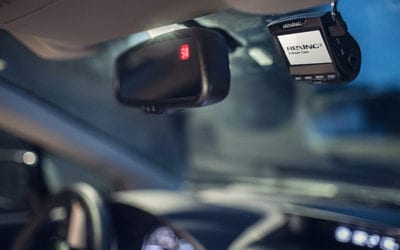
The features below make a dash cam what it is. You’ll find them on most, if not all, dashboard cameras on the market today. Whether you’re looking for the best dash cam for car, truck, or van use, these are the features to watch for.
Auto-On and Auto-Off
Dash cams are designed to turn on and off with your car—but only if you leave the camera plugged into the cigarette lighter outlet between drives. If you disconnect the camera between drives, just plug it in to power up.
30 or 60 FPS
For most dash cams, the number of frames captured per second (fps) is 30, but some cameras take 60fps to better capture fast action.
Auto-Record
Many dash cams start recording the moment they turn on, while others activate the record function by sensing when the car is in motion.
Wide-Angle Lens
Wide‐angle lenses help dash cams see and record more of the areas surrounding a car.
Audio Footage
Many dash cams come with a built‐in microphone to capture both audio and video footage.
Image Correction
Most dash cams have some ability to manipulate light within an image while recording so that night shots, high-contrast imagery, and low‐light footage are clearer when you play back the recording.
LCD Screen and Instant Playback
Most dash cams have an LCD screen and the ability to play back video on the spot. Instant playback is one of the most valuable features of a dash cam: it can exonerate you on the spot instead of in the courtroom.
Suction Mount
Most dash cams attach to your windshield with a suction cup.
Loop Recording
To keep you from having to manually erase hours of non‐collision footage, dash cams are designed to record over existing footage (starting with the oldest) when the memory is full.
Lockdown Recording
In the even of a crash, many dash cams will lock down the automatic recording. This means it will catch the entire event and save it. A lockdown recording won’t be looped over, so you don’t have to worry about downloading it in the aftermath of a scary situation.
32GB Storage Capacity
Most dash cams take micro SD cards with up to 32GB capacity (about five hours of HD footage). And pay attention to the details—some dash cams come with SD cards included, but others require you to buy one separately. Some dash cams are fussy about the class of the card, so read the reviews to see which SD cards worked for other customers.
G-Sensor
Most dash cams have a sensor that detects sharp turns, rapid braking, and other signs of collision. When you trigger the sensor, the camera saves that footage automatically or with the touch of a button. This type of footage is typically protected from automatic looping, so you won’t accidentally lose crucial video footage.
Transferrable Files
Download high-definition video footage anytime using an SD adapter or USB cable. Some dash cams come with companion software, but not many‐it’s usually your job to find a compatible media player for your camera’s file type.
HD Resolution
Almost all dash cams record in HD (1080 x 720 pixels or more) to help you see license plates and other details clearly.
Disclaimer
Amazon.com list price as of 11/1/19 2:30 p.m. MST. Product prices and availability are accurate as of the date/time indicated and are subject to change. Any price and availability information displayed on Amazon at the time of purchase will apply to the purchase of this product. Safewise.com utilizes paid Amazon links.
Certain content that appears on this site comes from Amazon. This content is provided “as is” and is subject to change or removal at any time.
The post Best Car Dash Cams appeared first on SafeWise.
via Blog – SafeWise www.safewise.com/resources/...

Want to create own pages and collaborate?