Last updated: November 18, 2019
Frontpoint updated its contract terms, pricing, and package offerings on November 18. We’re happy with lots of these changes, though we wish there were a cheaper monitoring option.
Last updated: November 18, 2019
Frontpoint updated its contract terms, pricing, and package offerings on November 18. We’re happy with lots of these changes, though we wish there were a cheaper monitoring option.
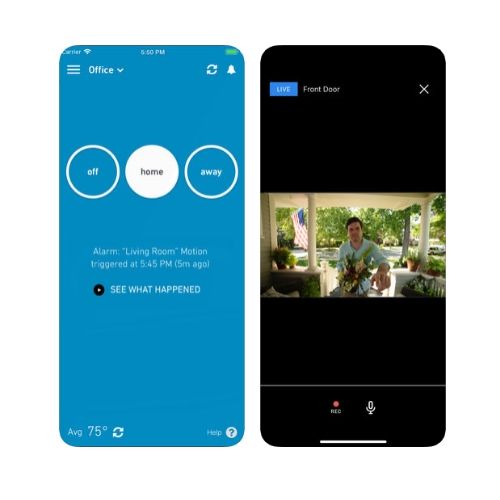
The Vivint Smart Home app makes it easy to secure your home and control smart home features (like turning up the heat on the way home from the ski hill) from anywhere. Many home security system apps are compatible with smart home controls, but they usually require multiple apps to control everything.
With Vivint, you’ve got one app that does everything from arming your system to turning off the lights. And you don’t need to upgrade to a more expensive monitoring plan to get the app—Vivint includes it with every package.
It seems like the only types of security system apps out there would be apps for Android and apps for iOS, but it gets a little more complicated. Here’s our guide to navigating the differences between proprietary and nonproprietary (Alarm.com) home security apps.
Proprietary apps are developed by security companies specifically for their own systems. Each company owns its app and is responsible for features, updates, bug fixes, and customer satisfaction. App quality varies by company, but the benefit of a proprietary app is that it’s tailor-made for your system. Depending on the resources of your security company, app development can be slower than with a generic, industry-wide app.
Many companies forgo developing their own app and partner with Alarm.com instead. Alarm.com is a home security industry leader for both security equipment and the technology that supports it—including mobile apps. The Alarm.com app is compatible with a number of security systems and generally receives high customer ratings. The downside is that updates and new features are dependent on Alarm.com and not your home security company, so some things like compatibility with new smart home devices can be delayed.
| Monitoring Contract Required |
| Available with All Monitoring Plans |
| Compatibility |
| Alarm.com |
| Vivint Smart Home | ADT Pulse App | Frontpoint Mobile | SimpliSafe App |
 |
 |
 |
 |
| Visit Site | Visit Site | Visit Site | Visit Site |
| Yes | Yes | No | Yes |
| Yes | No | Yes | No |
| iOS 11.0 or later Varies with Android device |
iOS 10.0 or later Android 4.4 and up |
iOS 10.0 or later Android 4.4 and up |
iOS 9.0 or later Android 4.3 and up |
| No | No | Yes | No |
| Read Review | Read Review | Read Review | Read Review |
You’ll need to have a customer account with Vivint to use its app, but once you do, get ready for a slew of home automation functions. Adjust the lights so they’re bright when you pull in the driveway, turn down the heat while you’re at the office during the day, or unlock the front door for your kids if they forget a key.
Our favorite feature is the built-in AI assistant (Sky) that learns your routines and habits to help you manage your smart home right from your smartphone.
Sky uses geolocation and your home’s sensors to tell if your house is empty or full of a bunch of teenagers. It automatically adjusts the climate control to make sure the heat isn’t blasting when you’re out for the day (or when a crew of kids is upping the indoor temperature). Vivint Sky helps you conserve energy and stay comfy.
Plus, you can set up rules to automatically lock up the house at 10:00 p.m. each night and get an alert if a door or window opens after that time. If you’ve got rambunctious kids looking to exert a little too much independence, this feature could be a lifesaver.
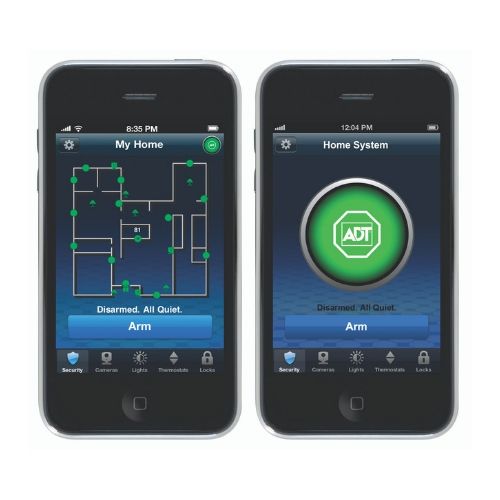
The ADT Pulse app works with ADT Pulse home security systems and monitoring. It boasts a full lineup of home automation controls so you can remotely let the kids in after school or check to make sure you didn’t leave the coffee pot on.
We especially like the voice control options that come with the ADT Pulse app. It works with Amazon Alexa and Siri, so you can boss around your alarm system and tell your smart thermostat what to do. Best of all, you can use voice control to arm and disarm your system—an option that isn’t always available from a security system app.
Unfortunately, the ADT Pulse app isn’t available with every ADT home security system. You can get the ADT Pulse app only with some of ADT’s pricier packages. But it does get high customer ratings in both the App Store and on Google Play, so the high price tag seems worth it to most users.
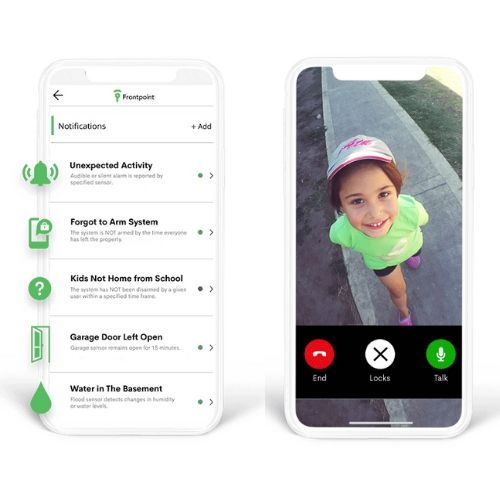
Frontpoint is the only security company on our list that uses Alarm.com technology for its mobile app. But Frontpoint has put in a lot of time to customize the app to best serve its customers. A great example of this is the company’s DIY installation guidance. Frontpoint was one of the first home security companies to automate installation through a mobile app.
Recently the Frontpoint app got a facelift, and users are raving about the simple, intuitive interface. The navigation menu is easy to follow, and the company has given more power to the individual user.
It used to take a call to customer service to change user settings, update login information, and make other standard changes. With the latest app update, those calls are no longer necessary—which is great news if you hate having to make phone calls (like me).
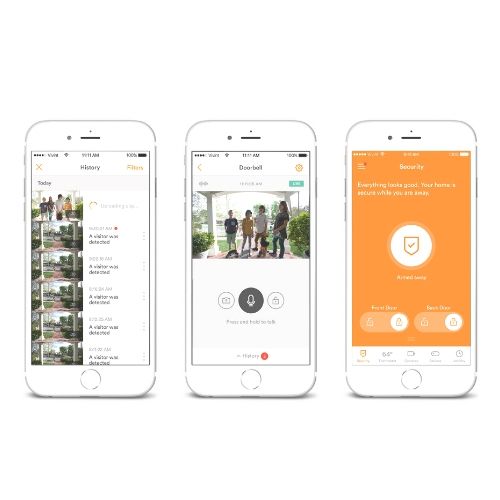
SimpliSafe has taken the home security world by storm, and its proprietary mobile app is one reason why. Just like every other part of a SimpliSafe security system, the app is easy to navigate and intuitive for the user.
But that doesn’t mean SimpliSafe skips all the bells and whistles. The latest app update lets you share video from your SimpliCam or Video Doorbell Pro on social media. We like this feature because we pick up more antics from our kids and pets than from potential intruders. Plus, all the best videos happen when the kiddos or puppies think we’re not watching.
But there are some quirks in the latest update that are frustrating—users complain of Push notifications that won’t turn off and restrictions that let only one user receive alerts.
We are frustrated, though, that you can’t use the SimpliSafe app unless you opt for the company’s more expensive monitoring plan. This is an industry trend, but it feels extra-stingy from a security brand that emphasizes its wireless prowess and budget-friendly prices.
When it comes to apps that give you remote control of your home security system, it’s important to determine your needs.
If you’re ready to purchase or upgrade your system, read more about top home security providers to find the best match for your lifestyle.
The post The Best Home Security System Apps appeared first on SafeWise.